If you fear of bricking your device then make a backup by going into 'Backup and Restore' option and click on Backup. It will backup your whole system files with data except SD Card data.
Click on Wipe Menu and then click the first one Wipe Preflash to format system, data and cache files. After they are done, swipe left to go back.
Now, tap the custom rom zip which you want to install.
The rom will start to install.
After installation, you will see this.
Now, swipe left to go back to main screen and click 'Reboot the phone'
After reboot, you will see Boot Animation of the Custom rom you just flashed.
MTK DROID TOOLS DOWNLOAD : MTK DROID TOOLS How To Flash ClockworkMod (CWM) Recovery on Any MediaTek (MT65xx) Android Device :
1. Download necessary files above.
2. Install the downloaded PDANet to your computer. It contains ADB Drivers.
3. Turn on your android device and connect it to your computer using USB Chord. (Make sure to Enable USB Debugging, go to phone Settings -- Developer Options -- Enable USB Debugging.)
4. From your computer, open MTK Droid Tools that you have downloaded above and extract it to your desired location.
5. Open MTK Droid Tools.exe from the extracted folder (Run as administrator). Wait for the tool to detect your device. (If UBIFS warning appeared in the status message, this process will not work for you. Only ext4 supported.). Notice on the bottom-left part of the tool, a YELLOW color indicator means that your android device is does not have root shell yet. If it is GREEN already, proceed to step 7.
6. Click ROOT button to enableroot shellyour device. Wait for the progress bar on the Status, see your phone to Grant Superuser access. If the color indicator turns GREEN, then you have successfully enabled root shell for your device.
7. Now, select the Root, Backup, Recovery tab and and further choose To Use Boot From Phone from the selections. Click Recovery and Boot, a message prompt will appear"To make CWM recovery automatically", click YES.
8. Wait for the tool to build the CWM recovery and another prompt will appear "install patched boot to phone?" select NO, wait a little bit more and another prompt will appear again"install created recovery to phone", now select YES.Auto Insurance
9. When the tool ask you to reboot your phone to recovery, click Yes and it will reboot to CWM recovery shortly. Check out your new custom recovery.Auto Insurance
Congratulations! You now have ClockworkMod custom recovery on your MediaTek android device.
Transfer the recovery.img file to the root of your phone memory via USB data cable
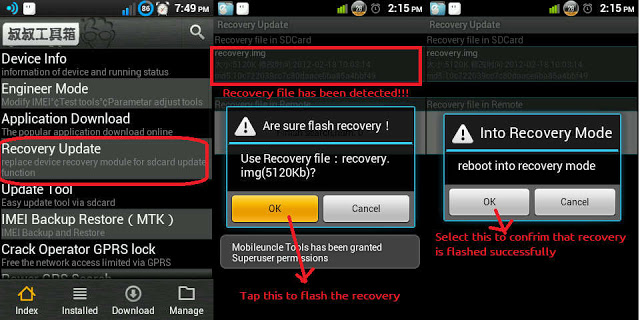
On your phone, download and install Mobileuncle Tools from the Play Store
Launch Mobile Uncle Tools. When it requests for Root Permissions, tap Grant
You should now see the Main Menu in Mobileuncle Tools
Tap Recovery Update
The app will scan your phone and list the recovery.img file you transferred to your phone earlier
Tap the recovery.img option. You should now see a dialog box asking you if you’re sure you want to flash the recovery. Tap OK
At this point, your phone may seem unresponsive. Just be patient and let the tool flash the recovery image. Once the flashing is complete, you should see another dialog box asking you to reboot to recovery, Tap OK
That’s it!! You have successfully installed CWM Recovery on your rooted Micromax Canvas 4 A210, and are all set to check out custom ROMs on your rooted device. Enjoy!!
SONY WALKMAN™ | The Best Clear Audio Experience (jb/kk)
FEATUREs :
• Latest WALKMAN build 8.5.A.3.2 • New and fresh UI • Clear audio setting | SoundEnhancement • Clear audio+ • Equalizer preset (such as Rock, Easy Listening, Jazz, etc) • Manual mode of preset (Custom and User-defined) • Clear bass • Clear stereo • S-force Front Surround • Surround Sound VPT (Soundstage option) • Dynamic normalizer • Visualizer • Album art • Adjust background color following album art • Music control on notification • Edit Music Info • Download Music Info (work on v3.5+) • SensMe • Throw function (on v3.5+) • DLNA/Media server (on v3.5+) • Qualcomm bass boost (only work for device with snapdragon chipset) • xLoud (Actived by default) can't settings • Additional the libs, and files make a more awesome sound output
REQUIREMENTs :
• Rooted • Deodexed/Odexed (Deodexed is recommended) • Custom recovery | CWM, TWRP, PhilZ Touch, etc • Free 40 - 50 MB of memory system ROM on your device • Used ROM base on Jelly bean 4.1.2, 4.2.2, 4.3.x and KitKat 4.4.2 like AOSP/CM10.2/CM11/PA/AOKP/MIUI/Liquid smooth etc
DOWNLOAD HERE check the instructions too. *i m not responsible for a bricked device. do it on your own risk.
Mostly Android Users Face The Heating Problem With Their Android Smartphone , Some Users Face Heating Problem While Playing Game Some Face Heating Problem Just By A little Bit Use , Heating Of Android Phones occur Mostly Due To Some Apps Running in Back Ground . Those Apps are use less and May push Your android Phone To Heating problem .
And Some Times Heating Of Android Phone Occurs Due To Hardware Failure issues , If There is a Hardware Issue With Your Android Smartphone And it is Giving excessive heat , Then You have to seek Help From Your Nearest android Service centres , Because Android Phone Heating issues Due To Hardware Malfunction / Failure aren't Possible to Be solved By Software Tweaking .
The heating in your droid maybe because of RAM and CPU usage so controlling this might be helpful ie by closing apps and not allowing them to work in background
Android 5.0 Lollipop’s Material Design is much more mature and stylistically uniform throughout the entire system than KitKat ever was, no stone has been left unturned by Google’s developers when implementing the design changes. The wallpapers match this new look perfectly, and you can already download them. Install Android 5.0 Lollipop wallpapers
Google also introduced a new SMS and MMS app with Material Design. Messenger is a lot cleaner looking and user friendly than Hangouts, however it doesn’t combine your Hangouts messages. Google has basically gone back to the old system of two separate apps: one for text messages and one for messages using mobile data. Install Lollipop Messenger.
There was an Android L keyboard available since the Google I/O but this required root. Now anyone can install the APK right from the XDA developer website. First we would recommend uninstalling any previous Google Keyboard app, then head to XDA and install the APK.
Once the Keyboard is installed, it will guide you on how to properly set it up, from switching it on in your settings, to making it your primary keyboard, to adding more languages. Make sure you go into the Lollipop Keyboard settings and choose either Material Dark or Material Light design. Install Lollipop Keyboard.
The Google Play Store had already received a Material Design update a while back, but the most recent update spreads the new user interface changes throughout the entire app, including a flatter icon, new animations and colors. Install the Google Play Store version 5.2.
In addition to having an Android 5.0 look and feel, what about sounds? You can make your phone sound like it’s got Lollipop running by simply installing the APK. Install Android 5.0 Lollipop sounds.
Nova Launcher
Though the APKS above will bring you individual components of Android Lollipop, there’s not much to speak of the functionality level. To get this, you could also just install the Nova launcher which will bring a bunch of new features that are very similar to Android 5.0.
For example, you will get Lollipop Circle Folder Animations, scroll indicator, icon themes for calculator, clock, contacts, downloads, email, dialer, settings and SMS apps and a preview of the scroll effects in the settings.
You will need to install some of the individual apps above to make the look complete though, like the wallpaper APK. Try out various combinations to see what you like the best.download.


.jpg "How to Flash Custom Roms on Gionee M2 using CTR Recovery | With Screenshots")
.jpg "How to Flash Custom Roms on Gionee M2 using CTR Recovery | With Screenshots")
.jpg "How to Flash Custom Roms on Gionee M2 using CTR Recovery | With Screenshots")
.jpg "How to Flash Custom Roms on Gionee M2 using CTR Recovery | With Screenshots")
.jpg "How to Flash Custom Roms on Gionee M2 using CTR Recovery | With Screenshots")